MillerWelds Logo
Education Enterprise Series Header

Education Solutions

Education Solutions from Miller help develop welding skills for classrooms, labs, and workforce programs. Browse the variety of solutions that Miller has to offer from our Training Equipment products to our Training Materials library and products you need to create the optimal Weld Lab for your facility.
Subscribe-to-Newsletter.jpg

Weld Lab Solutions

View how you can bundle Miller products to build the ultimate Weld Lab.
Miller Training Comp

From Classroom to Career

Learn how these training solutions can be an effective addition to your welding program in order to train and inspire the next generation of welders.

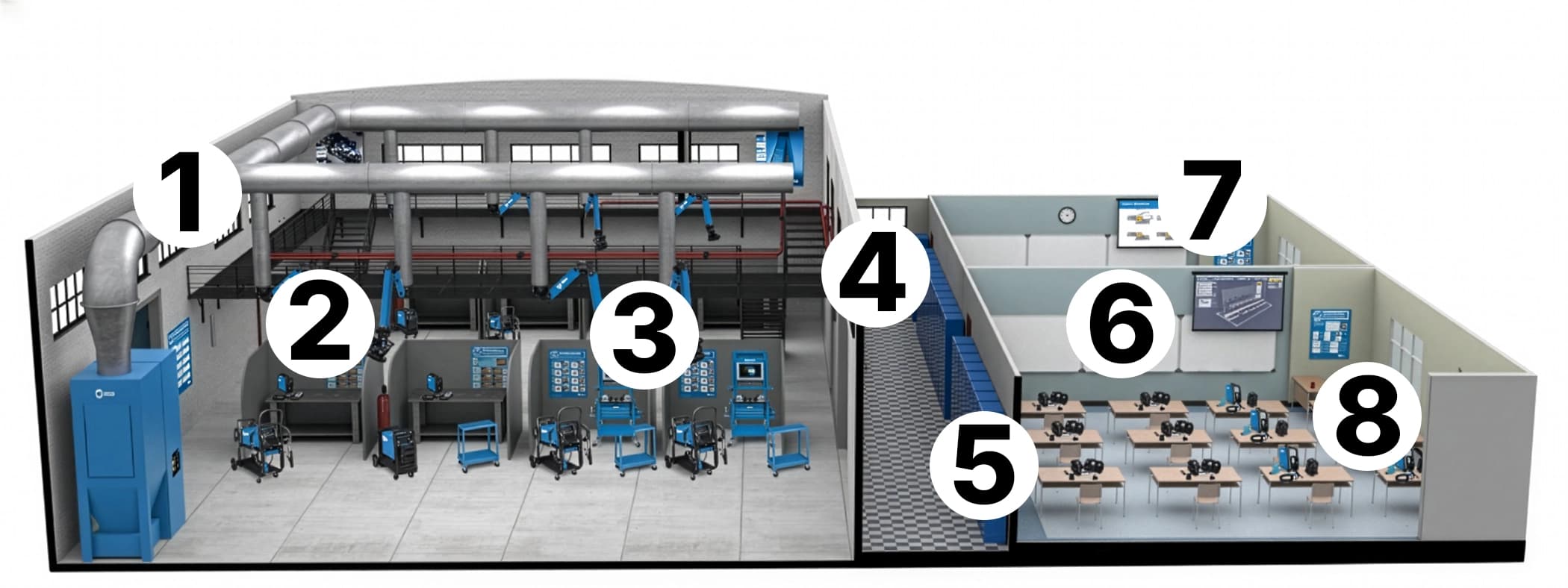
1. Centralized Fume Extraction

Miller® FILTAIR® Centralized Fume Extraction Systems have multiple capture sources and are specifically customized to help mitigate weld fume particulate.

2. Weld Lab Training

Take your skills from the classroom into the welding lab.

3. Technique Advancement

Further your technique and save on consumable costs.

4. Locker Room Preparation

Prepare for hands-on training and get outfitted in personal protective equipment.

5. Augmented Reality Training

With augmented reality training systems, students emerge as stronger welders, needing fewer training hours and becoming more productive once they get into the welding lab.

6. Performance Feedback & Playback

Receive weld feedback as performance is scored, graphed and recorded for playback to help correct errors and reinforce proper welding techniques.

7. Standard Classroom

Engage in dynamic classroom discussions with advanced teaching tools like OpenBook™.

8. Welding Classroom Efficiency

Implement training solutions and traditional welding in your program to save up to 60% on consumables and reduce training time by up to 65% per semester.

Perfect Techniques

“Students love these machines. I have students coming in, day after day, during study hall and just sitting and welding with the systems. Upper-level students are constantly going back and forth between machine and the shop to perfect their techniques.”


Education Discount Available

Miller is your dedicated partner in fostering the industry’s next generation of successful welders. As part of this effort, we offer an educational discount through our distributor network.

Ask your local welding and gas supplier about Miller and Hobart education discounts.
 

Instructor Resources 

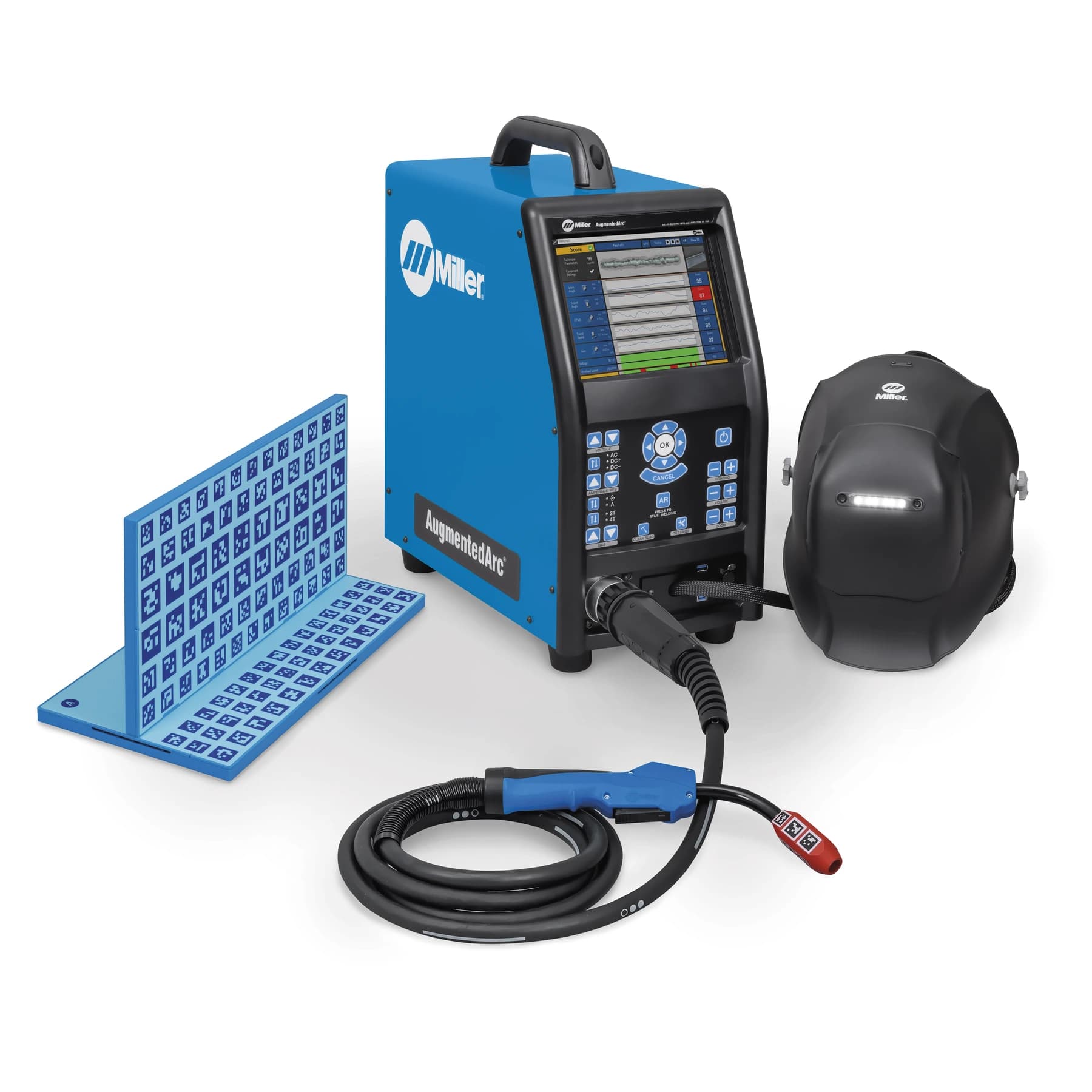
Miller AugmentedArc Augmented Reality Welding System

Solve the disadvantages of traditional welding instruction methods with the updated AugmentedArc® Augmented Reality Welding System from Miller.

AugmentedArc® Teacher Software Exporting / Importing Content

Watch this video for step-by-step instructions on how to export and import content as well as students in the teacher software.

AugmentedArc® Teacher Software Overview and Installation

Watch this video for step-by-step instructions on how to install the AugmentedArc® teacher software.

AugmentedArc® Teacher Software Log In

Watch this video for step-by-step instructions on how to log in to the teacher software in both classroom and stand-alone mode.

AugmentedArc® Teacher Software Modules and Tasks

Watch this video for step-by-step instructions on how to create modules and tasks in the teacher software, including creating a unit as well as a quiz task.

AugmentedArc® Teacher Software Exercises

Watch this video for step-by-step instructions on how to create an exercise in the teacher software, including configuring help guides displayed while welding.

AugmentedArc® Teacher Software Content Organization

Watch this video for step-by-step instructions on how to organize content in the teacher software including navigating the teacher software menus.

AugmentedArc® Teacher Software Courses

Watch this video for step-by-step instructions on how to create a course in the teacher software, including enrolling and unenrolling students in a course.

AugmentedArc® Teacher Software Profiles

Watch this video for step-by-step instructions on how to create student and instructor profiles in the teacher software, including enrolling a student to a course.

AugmentedArc® Teacher Software Report Generating

Watch this video for step-by-step instructions on how to review results, generate reports and use the virtual classroom in the teacher software.

AugmentedArc™ System Assembly

Watch this video for step-by-step instructions on how to assemble the AugmentedArc system after you receive it.

AugmentedArc™ System Connections

Watch this video for step-by-step instructions on how to connect accessories to the AugmentedArc including the MIG gun, TIG torch and optional foot pedal.

AugmentedArc™ Work Stand Assembly

Watch this video for step-by-step instructions on how to assemble the work stand, including how to setup different welding positions.

AugmentedArc™ Helmet Setup

Watch this video for step-by-step instructions on how to setup the welding helmet including adding the magnifying lens and headgear adjustment.

AugmentedArc™ Standalone Setup

Watch this video for step-by-step instructions on how to configure the standalone setup used for a single simulator.

AugmentedArc™ Classroom Setup

Watch this video for step-by-step instructions on how to configure the classroom setup for connecting multiple simulators together.

AugmentedArc™ Exercise Selection

Watch this video for step-by-step instructions on how to select and begin an exercise including configuring your own exercise.

AugmentedArc™ Welding Calibration to Scoring Analysis

Watch this video for step-by-step instructions on how to go from a welding exercise to the scoring screen including how to adjust the shades of the helmet.

AugmentedArc™ System Settings and Helmet Calibration

Watch this video for step-by-step instructions on how to change the system settings and calibrate the welding helmet.

How Augmented Arc Prepares Students for Real Welding